This year, the certificate page has been updated to better meet the expectations of your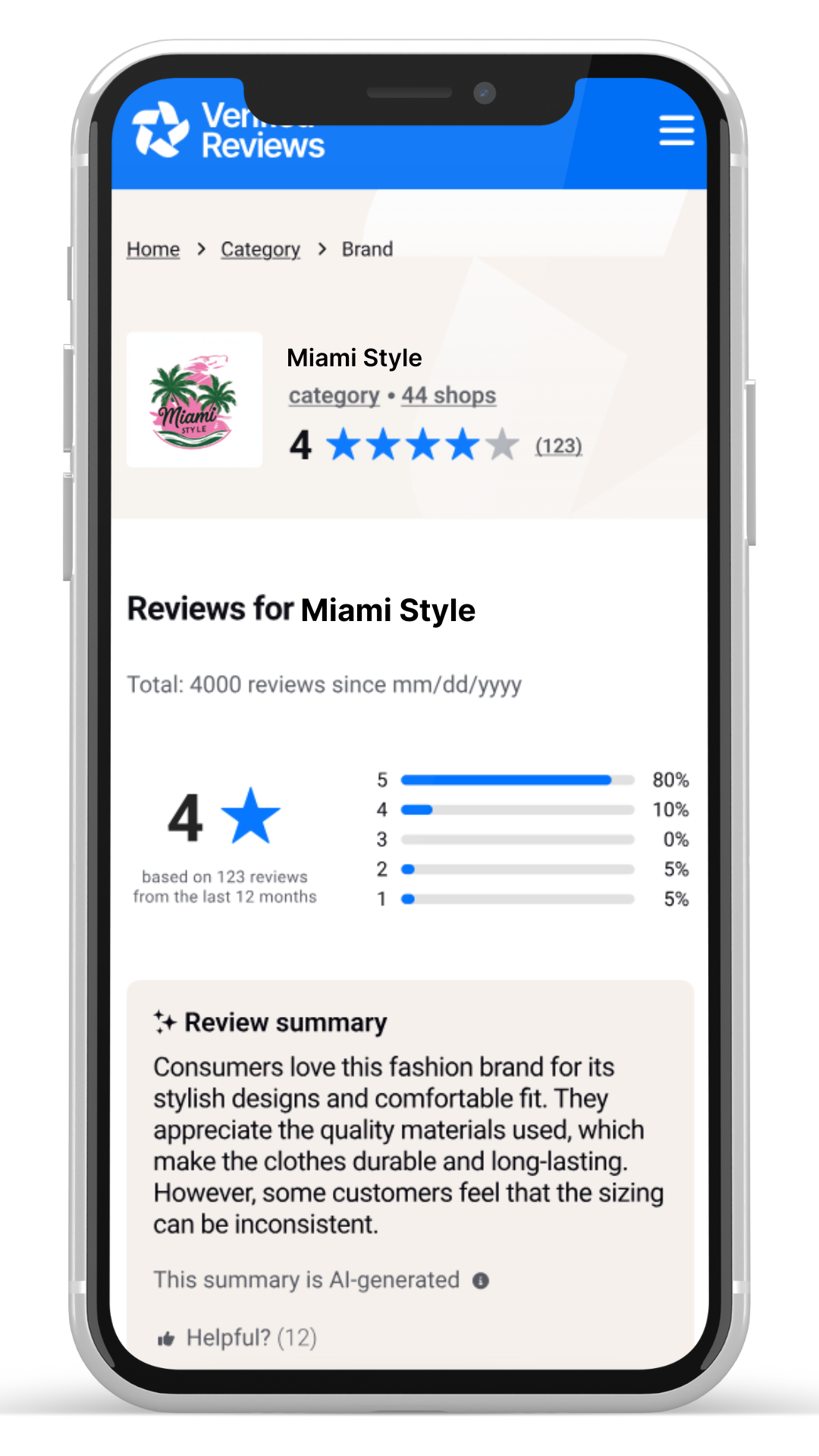 (future) customers. Completely redesigned, it now offers a more modern, clearer, and reassuring experience to support your consumers at a key point in their purchasing journey.
The certificate page is an official web page indexed by Google and other search engines for each company using Verified Reviews. It centralizes all your brand reviews transparently and serves as a true reference point for your customers:
- Your overall rating associated with the corresponding reviews
- A credible official page thanks to the “Verified Reviews” label
- Key visual indicators that reassure your consumers
- Optimized SEO thanks to the AI-generated brand review summary, which helps increase your site’s visibility and traffic
Fully responsive, the certificate adapts to all devices (desktop, tablet, and mobile) to provide a smooth and accessible experience for your customers, wherever they are and whenever they want.
To view your certificate
From the left-hand side menu, click on Display Reviews then View my certificate.
What’s new in 2026
The certificate page’s design and UX have been completely redesigned to strengthen your brand image while improving the consumer experience:
- A more fluid and engaging interface that helps understand reviews and boosts consumer trust and satisfaction
- Design improvements for a better user experience
- Enhanced SEO impact
Understanding your Certificate elements
The rating |
The certificate displays a rating out of 5. The average rating is calculated based on brand reviews received over the past 12 rolling months. This corresponds to the mention Based on X reviews from the last 12 months. |
Number of reviews |
Displayed:
This corresponds to the total number of brand reviews published since the start of your collection. |
Reviews/comments |
In the review list: you’ll find the details of comments for reviews collected over the last 5 years. |
Review distribution by rating |
Distribution is based on reviews collected over the last 5 years. |
Order |
Reviews are displayed in chronological order (most recent first), based on the publication date. Both the publication date and the order/experience date are shown. |
Consumers |
We display the first name in uppercase and only the first letter of the consumer’s last name. If the consumer chose to remain anonymous or if the reviews are older than 18 months, a nickname is shown instead. |
Filters |
Filters (text search / rating selection) are based on reviews displayed over 5 years. The number of reviews for each rating is calculated across the 5 years of displayed reviews. This is the overall volume; it does not change with the search/filter applied. |
Your information |
This section displays all your company information. It’s important to add a complete description as well as a category. |
Although reviews older than 12 months (up to 5 years) are displayed, the rating will always be based on the past 12 months. If no reviews were collected in the last 12 months, the mention under review or No reviews received in the last 12 months will be shown.
By clicking the 3 dots next to a review, the consumer can report it if it seems non-compliant, or request to modify it (only if they wrote it):
Learn more about how a consumer can modify a review.
You also have the possibility to edit the information displayed on your certificate.
Understanding review sources
By clicking on the Verified Review status, you can get more information about the nature of the review:
Collected and verified by Verified Reviews
- Organic post-purchase reviews collected through our standard processes
- Syndicated reviews
- Reviews submitted voluntarily through the certificate page, with proof of purchase
- Syndicated reviews coming from an external source.
- Reviews imported from an external source, even if they come from a trusted third party, will be displayed with this label.
These are reviews submitted through the voluntary review submission form.
Verified Reviews commitments
Your company information on Skeepers Verified Reviews, regarding the NF ISO 20488 standard and our T&Cs, will be displayed in this part of the certificate.
This section is also where a consumer who had an experience with your brand can voluntarily leave a review, as long as they provide proof of purchase or service.
You can also report a review.