The new review request form is a key step in the collection journey: it’s the one the customer will complete after clicking the action button in your email.
Designed for mobile use, it makes it easy to share structured feedback through questions about your brand and, if enabled, your products, while building trust and reducing drop-offs.
To ensure a good completion rate representative of your business, it is essential to personalize your account’s branding.
Currently, self-service form customization is only available for admin customers using the latest order collection version. It will gradually be rolled out to all Verified Reviews users.
If you have the old version of the form, contact our team to customize it.
Customers have 3 months to complete it after receiving the email; after this period, the link becomes inactive.
Benefits of the new form
Our new review request form is designed to maximize your response rate and turn more requests into published reviews!
- Mobile-first design: built to fit customers’ real usage and make it easy to respond on a smartphone anytime during the day.
- Reduced drop-offs during completion: respondents can start the form, pause it, and resume later thanks to progressive saving.
- Accessible to everyone: it provides a smooth and inclusive experience for all users, taking into account the digital accessibility principles of RGAA.
- New design: a more modern, reassuring interface that improves completion rates.
Indeed, the performance of the new form showed up to +47% higher response rates among our test clients.
To make the most of it, it’s essential to update your branding and communication tone to build trust and encourage more responses.
Customizing the form
You need an admin account to follow the instructions below:
- Go to the left sidebar menu, click
Collect Reviews, then Request customization.
- In the General settings tab, customize the general form settings.
- In Branding, add your logo and company colors for all available elements: background, text, primary and secondary colors, button background, and button text.
- In the Email tab, preview your review request email.
Customizable elements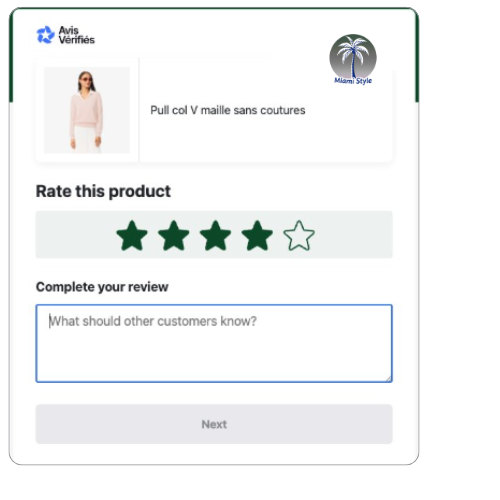
- Banner color
- Your brand logo in PNG or JPG
- Form background color
- Primary and secondary colors (stars)
- Action button background and text color
If the standalone customization tab is not available in your Verified Reviews menu, it means you are not using the standardized version of our form. Contact our team to customize it.